W♥M.com Update
Right now, the priority is WordPress, and the more I work on this current website (wheartm.com), the more I am understanding how it works. Who knows, maybe one day, I’ll be an expert.
So here are some behind-the-scenes updates that you may not be aware of.
Right now, the priority is WordPress, and the more I work on this current website (wheartm.com), the more I am understanding how it works. Who knows, maybe one day, I’ll be an expert.
So here are some behind-the-scenes updates that you may not be aware of.
 Events
Event listings will now include a copy of the preview. The preview may or may not have been published yet, due to scheduling grouping. Example is Dogs in a Pile show event is listed, but the article won’t be published until I finalize the other entries.
Also, at the bottom of the page, you can the venue’s information, such as address and maps and phone number.
Banner
We finally got a banner… it’s a background image with a dark tint. We have the option to upload multiple banners and have it randomly appear on the page. That’s something to consider for the future.
Socials
On the very top-right corner of the front page, you can see social links. I believe the social icons will also appear if you scroll to the bottom of the page.
Subscribe
There is also a ‘Subscribe’ button. If you’re not already logged in, you can also put in your email address and automatically get our content delivered to your inbox… if that is your preferred way of reading.
WordPress also offer an RSS reader, so you can also add us to your reader feed. Kind of neat, I didn’t realize WordPress was so robust when it comes to feeding content to readers.
 Plugins
The two plugins I’m using is the Events that is very good for a free plugin. I wanted to buy the ‘Pro’ version, but it turns out you can’t just buy it – you have to subscribe and it auto renews at $150 a year. It’s a shame, but I won’t pay for a subscription.
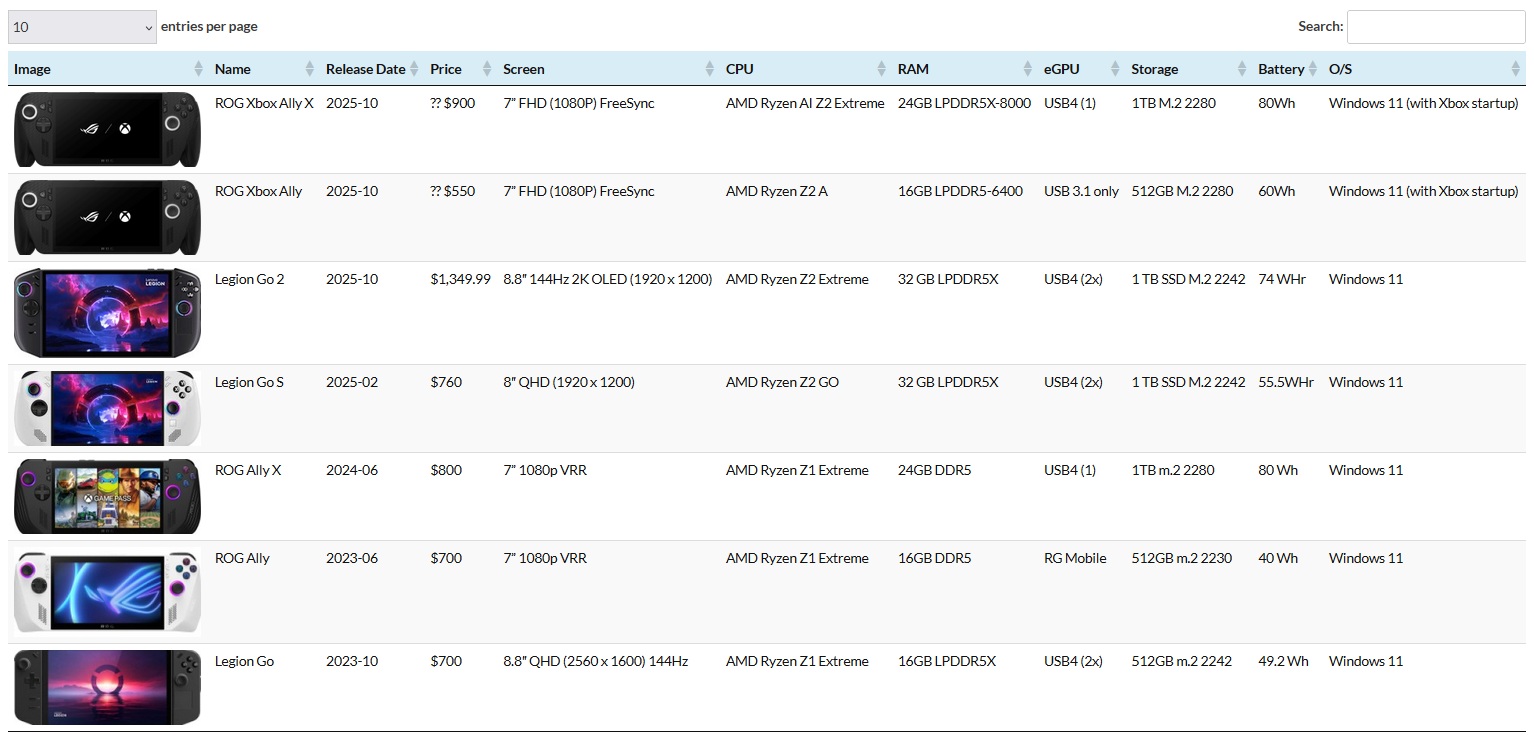
The other plugin I recently tried out is a Tables (like Excel) that you can insert into a post. I recently used it in The Next Generation PC Handheld and it looks pretty good. You can sort it on the fly, and the best part is that it contains an image with the line entry. As more PC Handhelds enters the market, I will update the database so you can visually see and compare the various devices.
If you know of a good plugin, please reach out and let me know. I’d like to try it out… and if it’s useful, I will incorporate it in the website.
Related
“Related” posts will automatically appear at the bottom of each page. This is done through context and word matches. For example, for this page, you may see other “Site Update” posts. I don’t have any control of what is served up, but it’s a better (and modern) way of showing previous entries. I used to have to handcraft this… and in some ways I kind of miss doing that (simply because I can choose what to excerpt).
Meet the Team
I have quickly drawn four cartoon animals to be included on Meet the Team – but I do not like the plugin… so I may deactivate it but still re-use the vuart for a future plugin.
Update: As of 9/6/2025 TypePad is back online. I am resuming downloading backup for the year 2016 and working backwards.


